Managing licenses, contracts, certificates, permits, insurance policies, and other renewal deadlines in Excel can work when you have a small number of records. But as your business grows, renewal tracking can become increasingly manual.
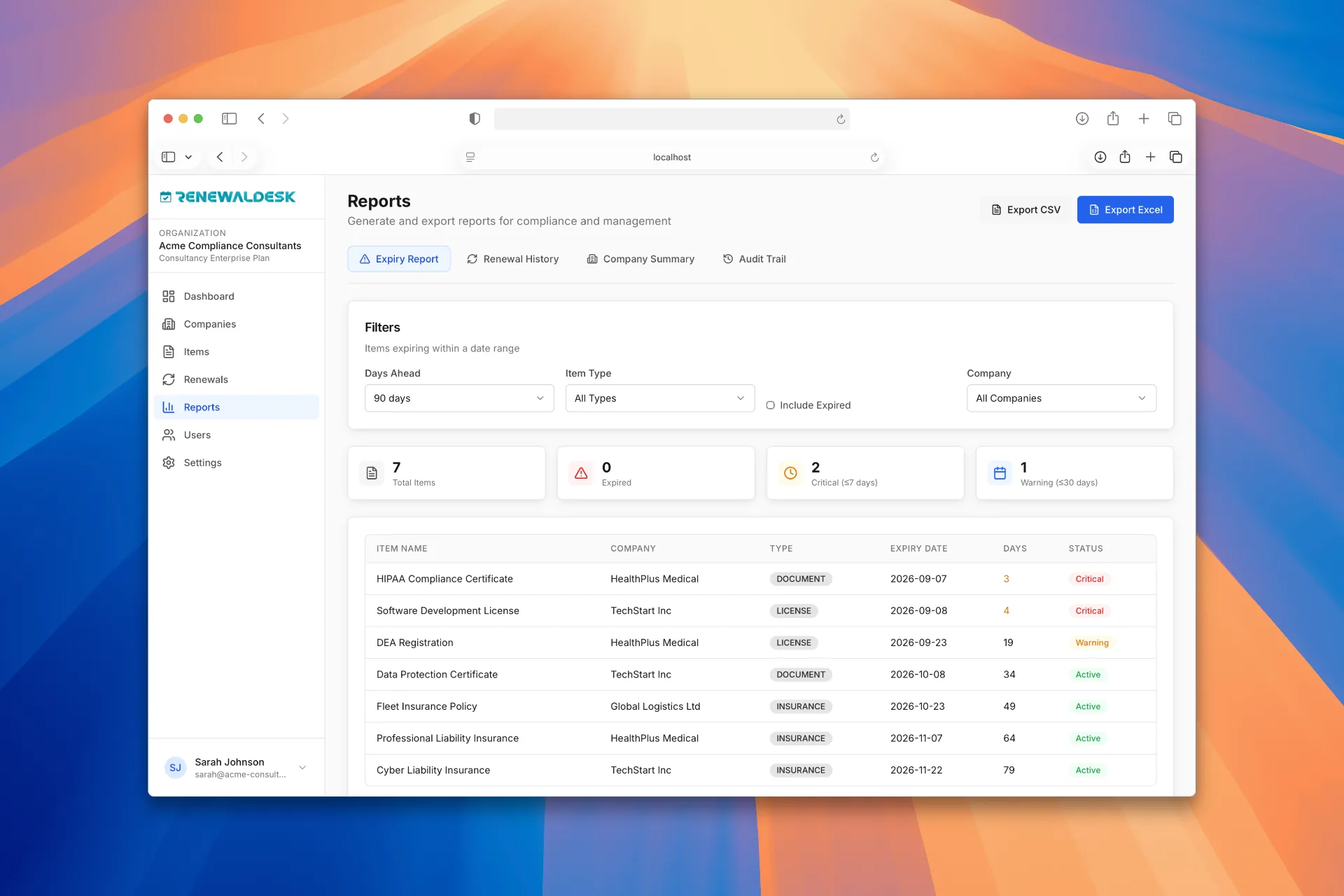
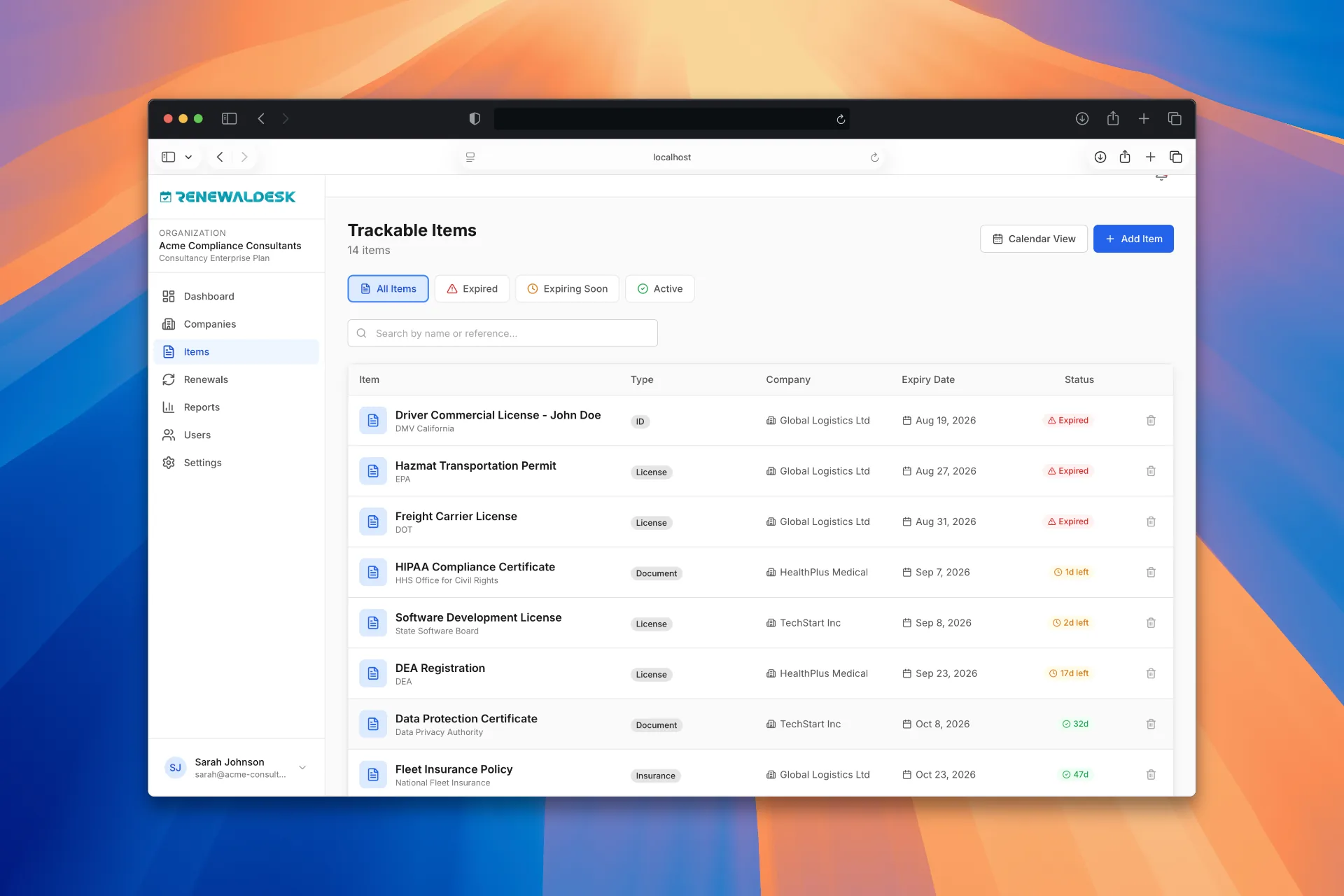
RenewalDesk is built specifically to help businesses and consultancies manage expiry dates, renewal reminders, documents, and follow-ups in one place.
If you're currently using an Excel renewal tracker, this comparison will help you decide whether it's time to move to dedicated renewal management software.
The difference is simple: Excel stores your renewal data. RenewalDesk helps you manage the renewal process around that data.
Capability
Excel
RenewalDesk
Store renewal dates
✓
✓
Track expiry dates
✓
✓
Sort and filter renewals
✓
✓
Automatic renewal reminders
Limited
✓
Email notifications
Manual / additional setup
✓
Renewal dashboard
Limited
✓
Track multiple clients
Possible
✓
Document management
Basic
✓
Renewal status tracking
Manual
✓
Assigned responsibility
Manual
✓
Renewal history
Manual
✓
Recurring renewal workflow
Manual
✓
Centralized renewal management
Limited
✓
Built specifically for renewals
✕
✓
What Is an Excel Renewal Tracker?
An Excel renewal tracker is a spreadsheet used to record important dates and information related to renewals. A typical spreadsheet might contain:
Client
Document
Expiry Date
Status
Responsible Person
ABC Trading
Trade License
15 Oct 2026
Pending
John
XYZ Services
Insurance
28 Oct 2026
In Progress
Sarah
Global LLC
Certificate
10 Nov 2026
Not Started
David
For a small business, this can be a perfectly reasonable approach. The problem isn't Excel itself. The problem is what happens when the spreadsheet becomes the entire renewal management system.
Why Businesses Outgrow Excel for Renewal Tracking
As the number of renewals increases, the work around the spreadsheet increases too. Someone has to:
Check upcoming expiry dates
Filter records
Identify overdue renewals
Send reminders
Follow up with clients
Update renewal status
Upload or locate documents
Assign work
Record completed renewals
Check the spreadsheet regularly
At some point, the team isn't just maintaining a spreadsheet — they're manually operating a renewal management process. That's where RenewalDesk can help.
RenewalDesk: Built Specifically for Renewal Management
RenewalDesk is a renewal management platform designed to help businesses organize and monitor recurring expiry dates. You can use it to manage:
Business licenses
Contracts
Certificates
Permits
Insurance policies
Compliance documents
Employee certifications
Other documents with expiry dates
Instead of relying on a spreadsheet and manual follow-ups, RenewalDesk provides a centralized system for monitoring upcoming renewals.
RenewalDesk vs Excel: Feature-by-Feature
1
Renewal and Expiry Date Tracking
With Excel
•Excel makes it easy to create an expiry-date column.
•You can use formulas to calculate the number of days remaining.
•The spreadsheet still depends on someone checking it regularly.
With RenewalDesk
Renewal dates are organized within a dedicated renewal management environment.
View upcoming expiries and identify renewals that require attention.
Better for ongoing renewal management: RenewalDesk
2
Automatic Renewal Reminders
With Excel
•You can calculate reminder dates in Excel.
•But the team still needs a reliable process for acting on them.
With RenewalDesk
RenewalDesk is designed around automated renewal notifications.
Stay aware of upcoming expiries without relying entirely on manual spreadsheet checks.
Better for automated reminders: RenewalDesk
3
Managing Multiple Clients
With Excel
•Complexity increases quickly as clients grow.
•Multiple worksheets and workbooks
•Different spreadsheet formats
•Duplicate records and manual filtering
•Difficult client-level reporting
With RenewalDesk
A centralized approach to managing renewal records across clients.
Scales from 5 clients to 50 or 500 without multiplying files.
Better for multi-client renewal management: RenewalDesk
4
Renewal Dashboard
With Excel
•Rows and columns are useful for storing information.
•Answering operational questions requires manual filtering and sorting.
With RenewalDesk
Answer questions like: What expires this week? What is overdue? Which renewals are pending?
See which client has the most upcoming renewals at a glance.
Better for renewal visibility: RenewalDesk
5
Document Management
With Excel
•Documents are stored somewhere else and linked manually.
•No structured connection between a record and its supporting files.
With RenewalDesk
Renewal-related information lives in a structured workflow.
Licenses, certificates, and documents stay attached to the right record.
Better for managing renewal information: RenewalDesk
6
Renewal Status
With Excel
•You can track statuses like Not Started, In Progress, Submitted, Completed, Expired.
•Someone needs to keep those statuses updated manually.
With RenewalDesk
Renewal status is part of the management process.
Your team gets better visibility into what is happening with each renewal.
Better for status visibility: RenewalDesk
7
Team Responsibilities
With Excel
•Excel can store a person's name in a column.
•But the team also needs to know what requires attention and when.
With RenewalDesk
A structured environment for managing renewal responsibilities and follow-ups.
Everyone knows who owns what — and what needs attention.
Better for accountability: RenewalDesk
8
Renewal History and Audit Trail
With Excel
•Maintaining history manually in Excel becomes difficult.
•Previous expiry dates, actions, and who did what are easy to lose.
With RenewalDesk
A structured history of renewal activity.
When was it renewed, updated, and by whom? What was the previous expiry date?
Better for audit-ready history: RenewalDesk
9
Scaling Your Renewal Process
With Excel
•20 renewals: a spreadsheet may be perfectly manageable.
•200 renewals: filtering, checking, and follow-ups start taking more time.
•1,000+ renewals: the spreadsheet becomes a significant operational dependency.
With RenewalDesk
Automation and centralized visibility stay strong as volume grows.
The larger the renewal operation, the stronger the case for dedicated renewal management software.
A centralized system can be easier to manage than multiple spreadsheets.
Missing a renewal matters
Expired licenses, certificates, permits, contracts, or insurance policies can create operational problems.
Your team relies on manual reminders
Automation can reduce repetitive follow-up work.
You need a clear view of upcoming renewals
A renewal dashboard can make prioritization easier.
Your Excel file has become a critical business system
If everyone depends on one spreadsheet to know what is expiring, it may be time to consider a dedicated system.
Excel Renewal Tracker vs RenewalDesk: The Real Difference
The decision isn't really Excel vs software. It is manual renewal tracking vs managed renewal workflows.
Excel gives you a place to store:
“What expires and when?”
RenewalDesk is designed to help you manage:
“What is expiring, when is it expiring, who needs to act, what is the current status, and what needs attention next?”
That's the fundamental difference.
What Does an Excel Renewal Tracker Cost?
Excel may already be available to your organization, making the initial financial cost low. But the total cost of renewal tracking includes more than the spreadsheet. Consider the time spent on:
Checking expiry dates
Sending reminder emails
Following up
Updating records
Searching for documents
Maintaining formulas
Fixing spreadsheet errors
Preparing renewal reports
Managing multiple versions
For organizations with a large renewal workload, these manual activities can become a significant operational cost. The purpose of renewal management software is not simply to replace a spreadsheet — it is to reduce the manual work surrounding renewals.
Why Choose RenewalDesk Over Excel?
Choose RenewalDesk when you want to move from a spreadsheet-based renewal tracker to a dedicated renewal management system. With RenewalDesk, you can centralize your renewal records, monitor upcoming expiries, organize renewal information, and automate reminders.
Instead of asking “did someone check the Excel file?” you can build a process around “what renewals need attention?”
Who Can Benefit From RenewalDesk?
RenewalDesk can be useful for organizations that regularly manage:
Compliance Consultancies
Manage renewal requirements across multiple clients from one centralized system.
Businesses
Track business licenses, permits, contracts, certificates and other recurring renewals.
HR Teams
Monitor employee certifications and documents with expiry dates.
Operations Teams
Track operational permits, registrations, insurance and other recurring requirements.
Professional Service Firms
Manage recurring client obligations and renewal deadlines.
Switch From Excel to RenewalDesk
If your Excel renewal tracker is becoming difficult to maintain, you don't have to keep adding more columns, formulas and manual processes. Move to a system designed specifically for renewal management. Keep your team ahead of expiry dates with RenewalDesk.
Is RenewalDesk an alternative to Excel for renewal tracking?
Yes. RenewalDesk can be used as an alternative to Excel-based renewal tracking when you need dedicated renewal management features such as automated reminders, dashboards, centralized records and structured workflows.
Can Excel track renewal dates?
Yes. Excel can store expiry dates, calculate days remaining and organize renewal information. However, teams often need additional manual processes to monitor those dates and send reminders.
What is the best Excel alternative for renewal tracking?
The best solution depends on your requirements. If you need dedicated renewal tracking, automated reminders and centralized visibility, renewal management software such as RenewalDesk can be more suitable than a spreadsheet.
Can RenewalDesk replace an Excel renewal tracker?
RenewalDesk is designed to replace spreadsheet-based renewal tracking for organizations that need a more structured renewal management process.
Is RenewalDesk suitable for managing multiple clients?
Yes. RenewalDesk is particularly relevant for consultancies and service providers that manage renewal requirements across multiple clients.
Can I track license expiry dates in RenewalDesk?
Yes. RenewalDesk can be used to organize and monitor license expiry dates along with other recurring renewal requirements.
Is Excel better than renewal management software for a small business?
For a small number of renewals, Excel may be sufficient. Dedicated software becomes more valuable as the number of renewals, clients, users and required reminders increases.
What happens when an Excel renewal tracker becomes too large?
Large spreadsheets can become harder to maintain, filter and keep updated. Teams may also spend more time manually checking dates and following up. A dedicated renewal management system can centralize this process and automate parts of the workflow.
Excel Is Great for Spreadsheets. RenewalDesk Is Built for Renewals.
You don't need to abandon Excel because it is a bad tool. You move beyond Excel when your renewal process becomes bigger than a spreadsheet can comfortably manage. Stop relying on spreadsheets to remember what expires next.